
Point it at one switch. Get the whole building.
CrossScan reads that switch, follows the wired connections to the switches behind it, and tells you what is plugged into every port: the phones, cameras, room systems, displays and DSPs. For each one it names what the device probably is and which room it probably belongs to, then shows how sure it is and exactly what evidence says so.
It only reads. No switch admin login, no SSH, no Telnet, no enable mode, and it never changes a setting. By default it never sends a packet to an endpoint either: it asks the switch. Two things are optional and both are off until you turn them on, active endpoint probing and the AI assist, and CrossScan shows you exactly what each one would send before it sends it.
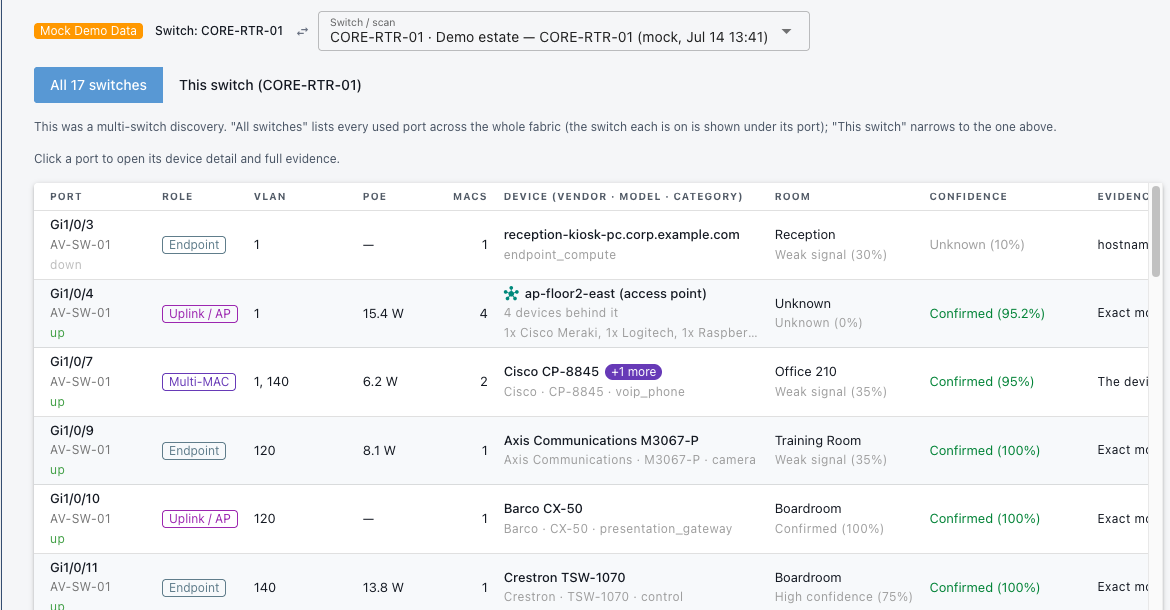
The Port Map. Every physical port, the device on it, the room, and how sure CrossScan is.
The problem
The as-built is the line item nobody funds.
A published integrator price sheet puts a conference room at $28,500 and gives the "training and documentation" line $800 of it. That is 2.8% of the room, for a document that honestly costs several thousand to produce. So it gets done fast, or it gets done from memory, or it does not get done.
Then it rots. Someone moves a camera, a display gets swapped under warranty, a room gets rebuilt, and the only record of what is in that building is a spreadsheet with four wrong rows and nobody knows which four.
The tools you already own do not close this. Network tools see the fabric and cannot name the gear: they will tell you a MAC address is on port 12 and stop. AV tools name the gear and are blind below the endpoint: they know it is a codec and have no idea which switch port it is on. CrossScan exists in that gap.
The morning after
An inventory is what makes the next four jobs possible.
Every one of these was impossible on Friday, because you could not name what was on the wire. They are all straightforward on Monday, because now you can.
And when the scan stops being enough, you will know exactly why: because you have started running the scan on a schedule, and pasting the results somewhere, and wishing it would tell you what breaks if you reboot that switch. That is the job CrossConnect does, and it is a different job, not a bigger license.
What it does
It does four separate things, where most tools do one.
Those Monday jobs are only possible because the scan is doing four distinct things underneath, and most tools in this space do exactly one of them.
- It identifies AV gear By type and model, down to the part number. Cameras, codecs, displays, DSPs, network microphones, room PCs. It ships with 250 device fingerprints across 155 vendors: 48 verified against real hardware, and 202 placeholder signatures that score at half weight and say so in the evidence. It never lets a placeholder pass as a fact.
- It walks past the first switch One seed address returns the whole fabric. It follows the neighbor tables out to the switches behind it, three hops deep by default.
- It compares before and after Scan today, scan next month, and it tells you what appeared, what vanished, what moved port and what moved room. Devices are matched by hardware address, so a display that moved from Room 3 to Room 5 shows up as one device that moved.
- It scores health and AV readiness A health score per switch and across the estate, and a Go, Risk or No-Go per room for AV-over-IP, each with the reason and the fix. And it shows the derivation, so you can argue with it.
See it work
The real screens, with the real answers.
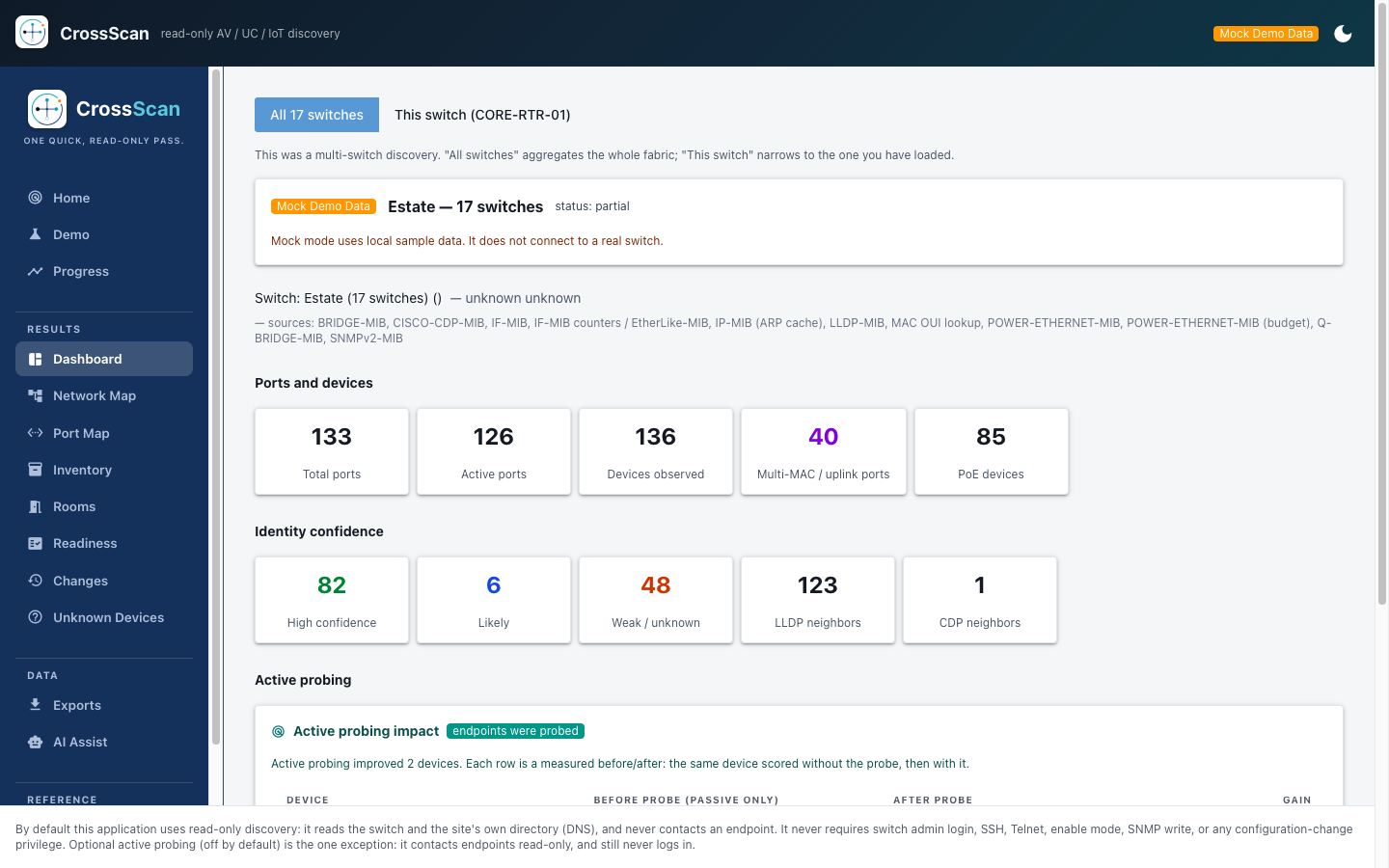
This is CrossScan's own output, put on the page. The engine ran against a 40-port switch, and every port, score and line of evidence below is what it returned. Follow the walkthrough, or ignore it and click around. Nothing here touches a network.
Start here. One scan, and the six screens it fills in. It takes about a minute, and you can stop and click around at any point.
CrossScan
read-only AV / UC / IoT discovery
Mock Demo Data
Scan a switch
Two things to fill in. Everything else is already set to a sensible default.
Sometimes called the SNMP community. It is never shown again and never written to any file or export.
One switch in, and the whole building comes out.
You just watched it turn one switch address into an inventory with the evidence attached. It does that to a real building in an afternoon.
Sample data. This demo does not connect to any network, and nothing you click changes anything.
The read-only guarantee
A test on every build proves it can only read your switch.
SNMP has a read command and a write command. CrossScan only ever loads the read one. The write command is not in the program, so there is no code in CrossScan that can change your switch, even if someone told it to. A test checks this on every build: it opens every production source file and fails if it finds an SNMP write, or an import of paramiko, telnetlib, fabric, netmiko or pexpect. CrossScan has no SSH login for the same reason. You are welcome to check the test.
The limits work the same way. CrossScan can tell you that port Gi1/0/9 is drawing 8.1 W and has a Crestron TSW-1070 on it, because the switch reports both. It cannot tell you whether your multicast is set up correctly, because the switch does not report that. When the switch has no answer, CrossScan marks the value unverified and leaves it alone.
What we have verified
48 of the 250 device fingerprints are verified against real hardware. The other 202 score at half weight and say so in the evidence, every time. A placeholder never passes as a fact.
That is the number because it is the number. Most vendors would write 250 and stop. You are going to hand this inventory to an auditor, and the difference between a signature we confirmed on a device and one we have not is the difference between evidence and a guess. CrossScan shows you which is which on every row.
The same applies to the demo. Every screen in the sample data is labeled sample data, because the worst failure a demo-capable tool can have is a customer believing it describes their network.
The rule it never breaks
A confidence score with no visible basis is a number somebody made up.
You have met this rule across the family already, and CrossScan is where you watch it applied to physical gear. It gives every device two independent scores, never merged: how sure it is what the device is, and how sure it is where the device lives. A device can be a confirmed Shure MXA920 that CrossScan is only 35% sure sits in Conference Room 101, and one combined number would hide exactly that.
01
Vendor is claimed only when the evidence names the product
The chipset in a device is not the device. A generic compute or module vendor signal is capped and can never reach Confirmed on its own.
02
Conflicting evidence is kept and penalized
When two sources disagree, both are shown and the score goes down. Nothing is silently resolved in favor of the tidier answer.
03
Demo data can never be mistaken for real
Every scan is badged, on every screen and in every exported row. The worst failure a demo-capable tool can have is a user believing sample data describes their network.

Before you ask
Is this just the small version of CrossConnect?
No. CrossScan draws the building once and then gets out of your way; CrossConnect runs on a server and operates the estate off that drawing every day after. The tell is your own behavior: once you are scanning on a schedule and wishing the results would warn you what breaks when a link fails, you have outgrown the scanner and want the platform.
Before you ask
The eight questions we get on the first call.
What access do you need?
One SNMP read credential for one switch. A community string for v1 or v2c, or a v3 user. No switch admin login, no SSH, no Telnet, no enable mode.
Will it change anything?
No, and a test proves it on every build rather than a salesperson promising it. The SNMP write command is never loaded, and no remote-shell library is imported in any production source file. The test fails the build if either appears.
How long until I have something useful?
An afternoon. One switch address in, and the port map for the building comes out. There is no rollout phase to get through first.
Does this replace the tools I already run?
No. Your network tools see the fabric and cannot name the gear on it. Your AV tools name the gear and cannot see which port it is on. CrossScan sits in that gap and hands its answer to both.
What happens when it is wrong?
It tells you before you find out. Every row carries a confidence score with the evidence underneath it. 48 of the 250 device fingerprints are verified against real hardware and the other 202 score at half weight and say so. Where the switch has no answer, the value is marked unverified and left alone rather than guessed.
Can I start with one switch?
That is the intended way to start, and the only way we recommend. One address, one afternoon. If the answer is useful you point it at the next building.
What data leaves my environment?
Nothing, in the configuration it ships in. CrossScan runs on your own machine and binds to 127.0.0.1, reachable only from that machine, and it stays off the network it is scanning. The AI assist is the one feature that talks to anything outside. It is off until you switch it on, and it shows you what it would send before it sends it.
Will it work in a restricted or air-gapped environment?
Yes, because there is nothing for it to phone home to. It is a desktop application with no server to stand up, no account to create and no cloud service behind it. Leave the AI assist off and it never reaches the internet at all.
What happens next
Four steps, and you can stop after any of them.
- Install it on your laptop. A double-click installer. Nothing goes onto your network and nothing goes onto your switches.
- Give it one switch address and a read-only SNMP credential. That is the whole of the setup.
- It follows the wire and returns the port map. Every port, the device on it, the room it is in, and the evidence behind each answer.
- Decide what the result is worth. Export it, hand it to whoever asked for the as-built, or point it at the next building.
The buying unit is one site. That is the smallest thing you can buy, and it is also the sensible first thing to buy: one building, scanned, before anybody argues about a second. No seat count to forecast and no platform to commit to.
An afternoon, and nobody drives anywhere.
Give it one switch address and a read-only password. You will have the as-built before the end of the day.